Anyone working in email marketing knows that maintaining solid deliverability is critical to your program’s success. All of the time and effort put into developing a strategy and then designing and building emails, means nothing if those messages never make it to the inboxes of your customers and prospects.
There are a lot of great third-party tools that can help you keep track of your email deliverability performance but if your company hasn’t invested in one of those platforms, there are still some quick and easy out-of-the-box options available to you in Marketing Cloud via Intelligence Reports.
In my experience with clients, I have found that the Pivot Table functionality in Intelligence Reports is an often overlooked tool. Below are a few ways you can use the Pivot Table feature to keep an eye on deliverability.
Daily Monitoring of Email Engagement
If you’re sending email regularly, it’s a good idea to get in the habit of doing a quick review of metrics each morning. Marketing Cloud makes this easy by allowing you to schedule automated reports straight to your inbox.
Create a high-level daily engagement report, as shown below. With this report you can look at overall Open Rate and Click Rate trends and easily recognize any significant changes in engagement.
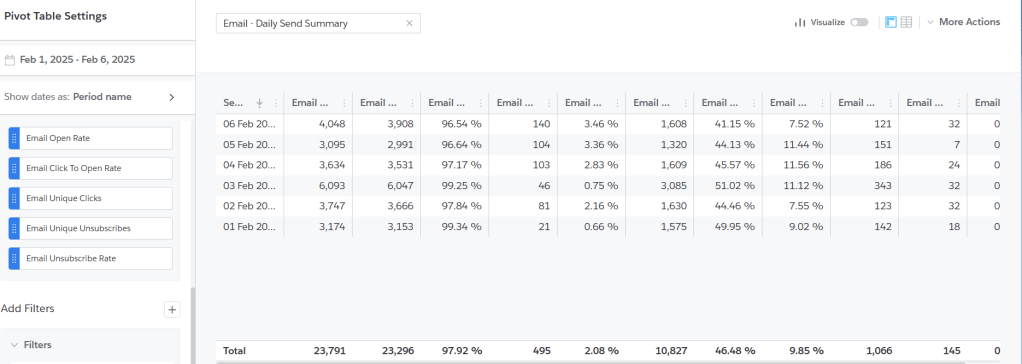
Daily Engagement By Email Message
This report is a little lower level and will allow you to identify any changes in engagement trends at the email level. It is possible for email providers to find issues with particular campaigns and start sending just those messages to the Junk Folder.
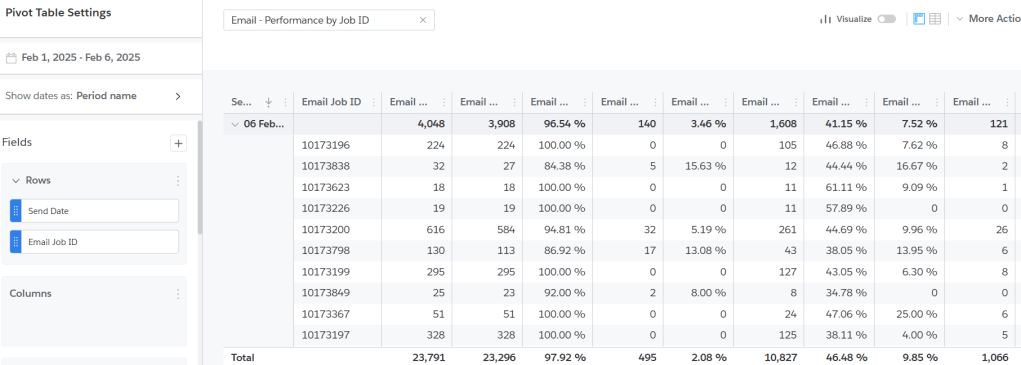
Daily Engagement By Domain
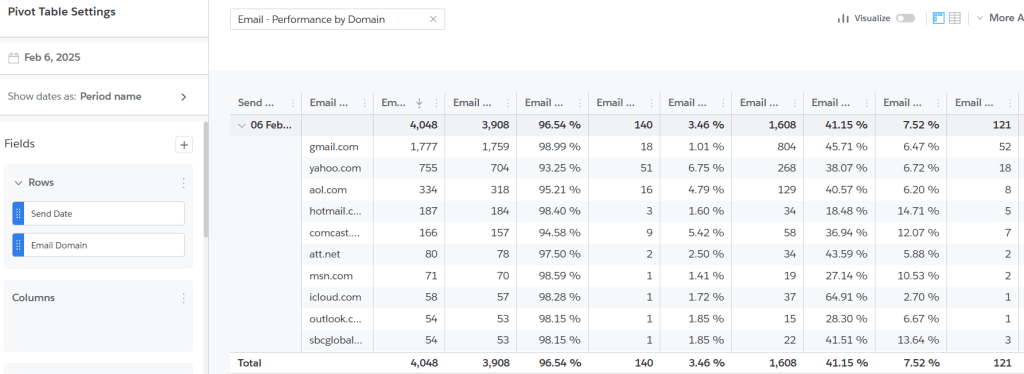
This is more granular and a very helpful report because it’s common to experience deliverability issues with one or two domains while the others continue on without issues. Although there are certain factors that apply to all email provider filters, they can each establish their own rules and the weight of each factor. Some domains such as Gmail, Yahoo and Hotmail, are known for being more particular.
Keeping a close eye on performance at the domain level can help you quickly identify if a certain email provider has started to mark your messaging, or a particular message, as spam. If you can identify when the issue began, you can also formulate some thoughts on what might have caused it. Some factors to consider:
- Did you send to a much higher volume than is typical?
- Did you increase frequency of sending? (i.e. Increased touchpoints for a holiday or big promotion)
- Did you send to a different audience? (i.e. Older or less engaged customers; A conference or partner list)
You won’t always be able to identify the exact factor that led to the deliverability issue. For instance, Marketing Cloud reporting won’t indicate if you’ve sent to a spam trap or honey pot.
If you find that you’re having deliverability issues with one or two specific domains, you’ll likely need to develop and implement a mitigation plan to help get out of the Junk folder. A mitigation plan often includes a rewarming schedule, where you greatly reduce the volume of sending and gradually rebuild the volume in order to get back into the inbox. Stay tuned for my next blog where I’ll provide tips and strategy for Deliverability Mitigation.
 Strategy in the Clouds
Leave a comment